
 Posts
Posts


-- Updated 21 Jan 2009 ---
The 1N4148 diodes should be replaced with Shottky diodes, such as, 1N5819 or 1N5822 for lower voltage drops at the diodes.
Friday, October 31, 2008
Battery backup for Microcontroller projects
My favorite PIC Microcontroller projects are clock projects. All of my clocks are powered by 5V DC wall wart adaptors. In case of power failure, the clocks stop and I have to set time when the electric power is restored. This problem will not happen with the clocks using DS1307 RTC as it provides battery backup capability. However, the clocks without DS1307 or any other RTCs will suffer from power failure. The circuit below is an example of the use of battery backup circuit with PIC16F627A or PIC16F628. The circuit can be used with other Microcontroller chips as a battery backup source. It also provide power failure signal (active low) for further processing.


Wednesday, October 22, 2008
MikroC "Hello World!" LCD example

Just an example of using MikroC to make a simple "Hello World!" PIC Microcontroller LCD project. The MCU is PIC16F877A (of course, it can be PIC16F887). The LCD display word "Hellow World!" on the first line and counting number on the second line. The image above is a screen capture of a simulation. I use the Proteus 7 VSM simulator to simulate my programs.
The source code in MikroC
//Test LCD
char *text = "Hello World!";
char mytext[3];
int i;
void main() {
// pic16f887
// ANSEL = 0x00; //Digital I/O for PORTA
// ANSELH = 0x00; //Digital Input for PORTB
// pic16f877A
CMCON = 0x07; //Set PORTA to Digital input
TRISB = 0; // PORTB is output
TRISA = 0x07; //PORTA as the input/output 0000 0111
i=0;
Lcd_Init(&PORTB); // Initialize LCD connected to PORTB
Lcd_Cmd(Lcd_CLEAR); // Clear display
Lcd_Cmd(Lcd_CURSOR_OFF); // Turn cursor off
Lcd_Out(1, 1, text); // Print text to LCD, 2nd row
while(1){
while(i<200){
IntToStr(i,mytext);
Lcd_Out(2,1,mytext);
Delay_ms(500);
i++;
}
i=0;
}
}
char *text = "Hello World!";
char mytext[3];
int i;
void main() {
// pic16f887
// ANSEL = 0x00; //Digital I/O for PORTA
// ANSELH = 0x00; //Digital Input for PORTB
// pic16f877A
CMCON = 0x07; //Set PORTA to Digital input
TRISB = 0; // PORTB is output
TRISA = 0x07; //PORTA as the input/output 0000 0111
i=0;
Lcd_Init(&PORTB); // Initialize LCD connected to PORTB
Lcd_Cmd(Lcd_CLEAR); // Clear display
Lcd_Cmd(Lcd_CURSOR_OFF); // Turn cursor off
Lcd_Out(1, 1, text); // Print text to LCD, 2nd row
while(1){
while(i<200){
IntToStr(i,mytext);
Lcd_Out(2,1,mytext);
Delay_ms(500);
i++;
}
i=0;
}
}
Tuesday, October 21, 2008
MikroC for PIC Microcontroller Programming

As a beginner in PIC Microcontroller, MikroC is my favorite compiler for my Microcontroller projects. I know 'C' already so it's very easy to use MikroC no complex settings involved. MikroC provides a lot of useful and handy libraries for example, LCD interface , UART, I2C, SD card access and many more. Good new, there is a free lite version that can compile code upto 2Kbyte which is enough for beginner projects. The commercial version is also affordable. Of course, I am not selling MikroC :) I just want to share information. Please visit their site for more info: http://www.mikroe.com/
MikroC sample for sending "Hello World!" to LCD
Lcd_Init(&PORTB); // Initialize LCD connected to PORTB
Lcd_Cmd(Lcd_CLEAR); // Clear display
Lcd_Cmd(Lcd_CURSOR_OFF); // Turn cursor off
Lcd_Out(1, 1, "Hello World!");
Lcd_Cmd(Lcd_CLEAR); // Clear display
Lcd_Cmd(Lcd_CURSOR_OFF); // Turn cursor off
Lcd_Out(1, 1, "Hello World!");
Laco Black Pilot Watch Limited 50 pcs.
This post is not related to Microcontroller but it is about what I am up to :)
My watch shop http://www.watchkzy.com has collaborated with Laco.de (a long history German watch brand) to produce limited edition watches that really limited. It not limited to 1000 or 100 pieces but there are only 50 pieces in the world !! There are only 50 persons in the world that own this watch. If you have this watch, it might be the only one in your country.
Normally you will see no less than 1000 pieces limited edition from the most watch companies and those watches will be selling at sky rocket prices. I can sell this piece for lower price as I cut all of the marketing cost. Do you know that more than 50% of a watch price is marketing cost?
Check the availibility and price from http://www.watchkzy.com/watch/laco/limited-black-pilot_english.html
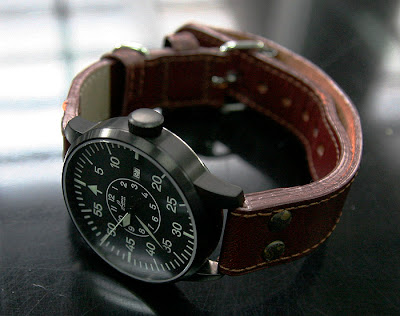
Please note that the strap in the picture is not comming with the watch.
My watch shop http://www.watchkzy.com has collaborated with Laco.de (a long history German watch brand) to produce limited edition watches that really limited. It not limited to 1000 or 100 pieces but there are only 50 pieces in the world !! There are only 50 persons in the world that own this watch. If you have this watch, it might be the only one in your country.
Normally you will see no less than 1000 pieces limited edition from the most watch companies and those watches will be selling at sky rocket prices. I can sell this piece for lower price as I cut all of the marketing cost. Do you know that more than 50% of a watch price is marketing cost?
Check the availibility and price from http://www.watchkzy.com/watch/laco/limited-black-pilot_english.html

Please note that the strap in the picture is not comming with the watch.
Sunday, October 19, 2008
ICSP: In-Circuit Serial Programming is great
At the beginning of my PIC journey, when I want to program *.hex file to my PIC microcontroller, I have to remove the PIC from the circuit board and place it on my PIC programmer to program the *.hex file to it and then I remove it from the programmer and put the PIC back to the circuit board. If I want to re-program the PIC, I have to repeat the process again. This process is very painful and it can cause PIC's pins broken.
Soon after I did a lot of that painful processes, I have discovered that my PIC programmer supports ICSP.
ICSP : In Circuit Serial Programming is very useful when I want to program *.hex file to PIC microcontroller while the PIC is on the circuit board. I just plug the ICSP plug to the ICSP jack on the circuit board. The ICSP jack for PIC microcontroller has a circuit like picture below. Now, I put ICSP jack to all of my PIC projects and I can easily upgade their firmware.

Soon after I did a lot of that painful processes, I have discovered that my PIC programmer supports ICSP.
ICSP : In Circuit Serial Programming is very useful when I want to program *.hex file to PIC microcontroller while the PIC is on the circuit board. I just plug the ICSP plug to the ICSP jack on the circuit board. The ICSP jack for PIC microcontroller has a circuit like picture below. Now, I put ICSP jack to all of my PIC projects and I can easily upgade their firmware.

Subscribe to:
Posts (Atom)


